Let me be real with you for a second. Every year, when the crescent moon for Dhul Hijjah is sighted, a familiar panic sets in not just about the Qurbani arrangements, but about the announcements. The mosque needs a poster. The community WhatsApp group needs a striking visual. My family’s shared sacrifice needs a dignified invitation.
And I, my friend, am no graphic designer. I don’t have Adobe Photoshop. I tried Canva templates last year, and my poster ended up looking like every other poster on the block—generic sheep, generic mosque silhouette, generic clouds. It worked, but it had zero soul.
This year, everything changed. I discovered how to use AI image generators. Not for sci-fi art or fantasy landscapes, but for something deeply traditional and spiritual: creating breathtaking, culturally rich Qurbani Eid posters. And the best part? You don’t need to type a single line of code or watch a 10-hour tutorial.
Here is my exact, step-by-step, no-fluff guide on how you can go from a blank mind to a professional-grade Eid-ul-Adha poster using AI, in under 30 minutes.
Why Bother with AI for a Religious Poster?
Before we dive into the trenches, let’s kill a myth. Some people think using AI for religious or traditional events is “cheating” or “soulless.” I disagree completely. The soul isn’t in the software; the soul is in the intention and the message.
Using AI allows you to:
- Avoid generic clip-art: You know those stock photos of a sheep staring blankly at the camera? AI can give you a dignified, artistic depiction of sacrifice that feels fresh.
- Customize for your community: Are you in a bustling city? A rural village? Does your mosque have blue domes or green? AI can adapt.
- Do it fast: You’re busy organizing meat distribution, not learning kerning and typography.
- Break language barriers: You can generate the visual in English, then use another tool to add Urdu, Arabic, Bengali, or Turkish text instantly.
Step 1: Choosing Your AI Weapon (The Tools)
You cannot swing a cat online without hitting an AI tool these days. But for posters, you need specific strengths. Here is the trio I use, from easiest to most powerful.
The Beginner’s Choice: Microsoft Designer (Bing Image Creator)
This is free, fast, and runs in your browser. It uses DALL-E 3 technology. The downside? It struggles with Arabic/Urdu text inside the image. For visuals only, it’s a miracle worker.
The Pro-Hobbyist: Canva’s AI Suite (Text to Image & Magic Media)
If you already pay for Canva Pro, you’re sitting on a goldmine. Canva’s AI isn’t as raw as Midjourney, but it integrates directly with their poster editor. You generate the background, then layer text over it. This is my personal go-to because Canva handles fonts and layout like a dream.
The High-End Artist: Midjourney
This is for folks who want oil-painting textures, cinematic lighting, or photorealistic details. It costs money (around 10−30/month) and requires Discord. But the quality? Unreal. If you want a poster that looks like a masterpiece from the Ottoman era, this is it.
For this guide, I’ll focus on Canva + Canva AI because it’s the sweet spot of price (free with limitations, pro for $12.99) and practicality.
Step 2: The Secret Language of Prompts (Don’t Just Type “Sheep”)
Here is where most people fail. They type: “Eid ul Adha poster with sheep” into the AI. The AI spits back a blurry, horrifying sheep mutant with five legs and a mosque growing out of its ear.
You have to speak to the AI like a kind, slightly literal artist. You need to describe:
- The Subject (What is the main focus?)
- The Style (Modern? Vintage? Minimalist? Watercolor?)
- The Mood (Peaceful? Grand? Somber? Joyful?)
- The Context (Eid prayer, sacrifice, family feast?)
“A majestic, peaceful scene for Eid al-Adha (Qurbani Eid). In the foreground, a dignified, healthy white ram with gentle eyes. In the background, a beautiful Ottoman-style mosque with a large central dome and two minarets during golden hour sunset. Warm, soft lighting. No violence, no blood. Watercolor painting style with rich greens, golds, and deep blues. Ethereal, spiritual atmosphere. High resolution. 16:9 aspect ratio.”
Why does this work? Because it sets boundaries. You specifically said “no violence” because AI sometimes gets confused and thinks sacrifice means gore. You gave an art style (watercolor). You gave a time of day (golden hour). Paste this into Bing Image Creator or Canva AI and watch the magic happen.
Pro tip for Qurbani: Avoid prompts that say “slaughter” or “sharp knife.” Keep it symbolic. Focus on the ram, the congregation, the act of giving, the Eid prayer. Keep the dignity of the animal front and center.
Step 3: The Dirty Little Secret – AI Cannot Write Text (Yet)
Here is the single most important thing you will read in this article: AI image generators are terrible at writing text. They will give you beautiful Arabic calligraphy that looks like a spider fell into an inkpot. They will write “Eid Mubarak” as “Eid Muabraakkk.”
Do not fight this. Accept it. Work around it.
Here is the workflow:
- Use the AI to generate the background image and the visual elements (the ram, the mosque, the sky, the lanterns).
- Download that image as a PNG.
- Open a real poster editor – Canva, Adobe Express, or even PowerPoint.
- Upload your AI image as the background.
- Manually add your text boxes on top using real fonts.
This is not a failure of AI. This is smart delegation. Let the AI handle the art. You handle the words.
Step 4: Designing the Poster – Layering Like a Pro
Once you have your gorgeous AI background, it’s time to turn it into an actual poster. Open Canva (free version works fine) and set your dimensions. For print, I use A3 (11.7 x 16.5 inches) or 1080×1920 pixels for WhatsApp stories.
The Fonts:
Do not use Comic Sans. I beg you. For Eid posters, lean into:
- For the title “Eid-ul-Adha Mubarak”: A bold serif font (like Playfair Display) or a clean sans-serif (like Montserrat Bold) if you want modern.
- For the Hadith/Quranic verse (optional): A simple, readable font like Lora or Merriweather.
- For the details (Date, time, location): Clean, thin fonts (like Poppins Light or Inter).
Step 5: Must-Include Content (Don’t Forget the Logistics)
A beautiful poster is useless if it doesn’t tell people what to do. The AI won’t know your local mosque’s schedule. You have to add this manually.
Here is a checklist of what to put on your Qurbani Eid poster:
- The Main Greeting: Usually “Eid-ul-Adha Mubarak” or “Happy Eid al-Adha.”
- The Date (Hijri & Gregorian): Write “10th Dhul Hijjah 1446 AH” and the corresponding Gregorian date (e.g., “June 7, 2026” – check actual dates locally).
Step 6: Polishing the AI’s Imperfections
Let’s be honest. The AI will mess up small things. You will generate that beautiful ram, and it will have a slightly weird ear, or an extra hoof. Don’t trash the whole image.
Use Canva’s Magic Eraser (if you have Pro) or the Spot Heal tool in Photoshop Express (free on mobile) to gently remove weird artifacts. Click on the extra leg. Poof. Gone.
If the AI gave you a mosque with seven minarets when you wanted two? Use the Generative Fill tool. Select the extra minarets, type “remove” or “sky,” and let the AI fix itself.
Don’t aim for perfection. Aim for feeling. A slightly imperfect AI ram that feels reverent is better than a clinical stock photo.
Step 7: Going Beyond the Still Poster – A Modern Twist
Since you’re already using AI, why stop at a static JPEG? For WhatsApp and Instagram, still images are dying. Use RunwayML or Pika Labs (both have free tiers) to animate your poster.
Take your final AI-generated poster image. Upload it to RunwayML. Use the “Motion Brush” tool to paint over the clouds and the mosque’s smoke (if any). Tell the AI to create “gentle breeze” or “slow pan across the scene.”
In 30 seconds, you have a living, breathing Eid video poster. Add a soft nasheed (instrument-free vocals) in the background using Canva’s audio library, and suddenly your announcement looks like a mini-movie.
The Secret Language of Prompts (Don’t Just Type “Sheep”)
Here is where most people fail. This is the graveyard of good intentions.
People open the AI tool. They stare at the blinking cursor. They type: “Eid ul Adha poster with sheep” and hit generate.
The AI thinks for a few seconds. Then it spits back a blurry, horrifying sheep mutant with five legs, three eyes, and a mosque growing out of its ear. The sheep looks terrified. The sky is neon green. There’s a random floating teapot for no reason.
Related article: How to Create Cinematic Look in Photos
This happens because AI has no common sense. It takes your words literally. “Sheep” could mean a real sheep, a cartoon sheep, a wool sweater, or a constellation. “Poster” could mean a movie poster, a warning sign, or a billboard. The AI guesses, and it guesses wrong more often than not.
Final Guide to Qurbani Eid Poster Design
You might look at the final product and think, “Wow, I barely did anything.” But you did. You directed the AI. You chose the color palette that reflects your community’s dignity. You added the specific prayer times. You picked the Hadith that resonated with you.
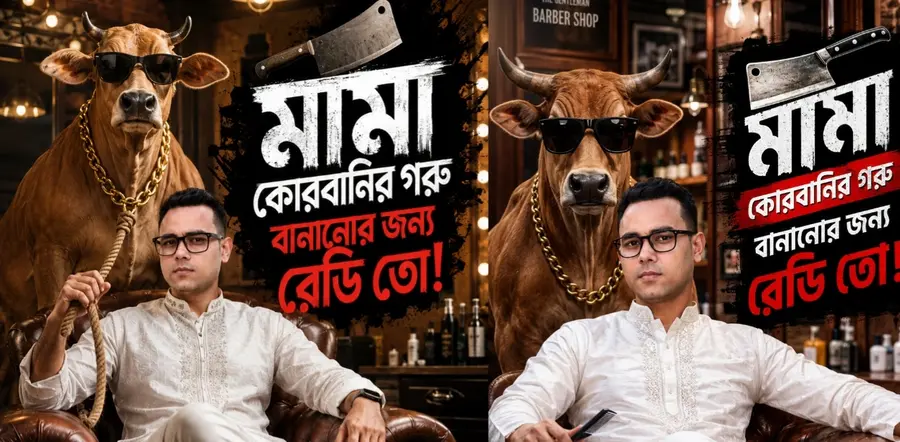
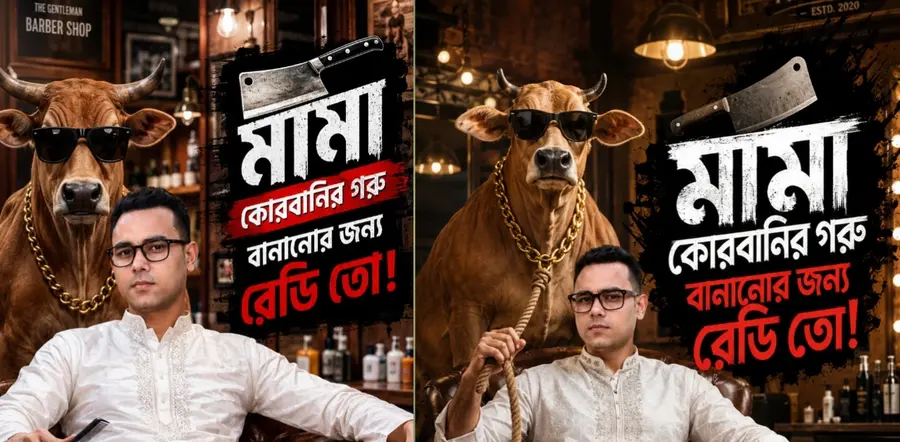
With this image face reference  Make Ultra-realistic cinematic Bangladeshi Eid-ul-Adha barber shop promotional poster, 9:16 vertical composition. A confident South Asian Bangladeshi man wearing black rectangular glasses sits comfortably in a luxurious brown leather Chesterfield armchair inside a premium modern barber shop. He wears an elegant white embroidered Eid panjabi and white pajama, one leg crossed over the other, A thick rope comes from the cow's neck and is held by in his right hand, looking directly at the camera with a calm confident expression.

Behind him stands a stylish light-brown cow wearing oversized black sunglasses and a thick gold chain necklace, posing like a celebrity bodyguard. Luxury barber shop interior with vintage mirrors, salon chairs, grooming products, warm tungsten lighting, cinematic atmosphere, shallow depth of field, photorealistic textures, HDR, highly detailed skin, realistic fabric folds, dramatic shadows, commercial advertising photography.

On the right side, large bold Bengali typography in distressed brush-paint style, white and red colors on a black grunge paint splash background. A metallic butcher cleaver icon above the text. Text must read exactly:

"মামা
 কোরবানির গরু
 বানানোর জন্য রেডি তো!"

Perfect Bengali typography, clean lettering, no spelling mistakes, strong visual hierarchy, viral social media thumbnail design, luxury advertising campaign artwork, professional Photoshop composite, cinematic lighting, ultra detailed textures, depth of field, sharp focus, hyper-realistic, masterpiece, 8K quality.

Camera: 85mm portrait lens, eye-level angle, f/1.8 aperture, professional studio lighting, high dynamic range, ultra sharp focus.

Negative Prompt:
blurry, low quality, low resolution, cartoon, illustration, painting, extra fingers, extra limbs, duplicate objects, distorted face, deformed hands, bad anatomy, cropped body, watermark, logo, text errors, misspelled Bengali text, unrealistic proportions, oversaturated colors, noisy image, motion blur, out of focus, deformed cow, bad typography, ugly face, artifacts

Settings:
Aspect Ratio: 9:16
Style: Photorealistic Cinematic
Quality: 8K
CFG Scale: 8
Steps: 40
Sharp Focus + HDR + Depth of Field
People who want a seamless workflow from generation to final poster. This is my personal go-to because Canva handles fonts, layouts, and export settings like a dream.
| Make Viral Design |
|---|
| Create Eid Poster |
| Design in Seconds |
Unreal quality. The best in the business. Handles complex compositions, lighting, textures, and moods better than anything else. Huge community with thousands of example prompts
Technology changes. But the essence of Qurbani Eid—obedience, sacrifice, community, and gratitude—never does. Using AI for your poster isn’t about being lazy. It’s about removing the barrier of technical skill so you can focus on what actually matters: inviting people to remember Allah, feed the poor, and celebrate with loved ones.